树的基础概念
一个树结构包含一系列存在父子关系的节点,每个节点都有一个父节点(除了顶部第一个节点),以及0个或者多个子节点
根节点、内部节点、叶节点(外部节点),键

- 顶部为根节点(11)
- 有子元素节点叫做内部节点(7,15,5,9,13,20)
- 没有子元素的节点称为外部节点或者叶节点(3,6,8,10,12,14,18,25)
- 键就是节点,在树中对节点的称呼
子树,深度,树的高度
- 子树由节点和他的后代构成,13,12,14就是一颗子树
- 节点的深度取决于祖先节点数量,比如节点3有三个祖先节点(5,7,11),深度为3
- 树的高度取决于所有节点深度最大值(最深层级)
二叉树
二叉树的节点最多只能有两个子节点,一个是左侧子节点,另一个是右侧子节点
二叉搜索树(BST)
二叉搜索树是二叉树的一种,但是只允许在左侧节点存储比父节点小的值,在右侧节点存储比父节点大的值
实现二叉搜索树(BST)
基本工具类
1
2
3
4
5
6
7
8
9
10
11
12
13
14
15
16
17
18
19
20
21
22
23
24
25
26
27
28
| <!--常量-->
const Compare = {
LESS_THAN: -1,
BIGGER_THAN: 1,
EQUALS: 0
};
<!--对比大小-->
function defaultCompare (a, b) {
if (a === b) {
return Compare.EQUALS;
}
return a < b ? Compare.LESS_THAN : Compare.BIGGER_THAN;
}
<!--node基本实现-->
class Node {
constructor(key) {
this.key = key // 节点值
this.left = null // 左侧节点
this.right = null // 右侧节点
}
}
<--BST基本实现-->
class BinarySearchTree {
constructor (compareFn = defaultCompare) {
this.compareFn = compareFn
this.root = null
}
}
|
向BST插入一个键
1
2
3
4
5
6
7
8
9
10
11
12
13
14
15
16
17
18
19
20
21
22
23
24
25
26
27
28
29
30
31
32
33
34
35
36
37
38
39
40
41
42
43
44
45
46
47
48
49
50
| // 向二叉树中插入一个键
insert (key) {
if (this.root === null) {
this.root = new Node(key)
} else {
this.insertNode(this.root,key)
}
}
insertNode (node,key) {
// 用传入的key和当前根节点比较,如果小于的话
/**
* 7
5 9
3 6 8 10
*/
// 节点小于根node的值
if (this.compareFn(key, node.key) === Compare.LESS_THAN) {
if (node.left === null) {
// 左侧没节点,直接赋值
node.left = new Node(key)
} else {
// 否则继续找下一个左侧节点是否满足
this.insertNode(node.left, key)
}
} else {
// 只能插入到右侧节点
if (node.right === null) {
node.right = new Node(key)
} else {
this.insertNode(node.right, key)
}
}
// 测试二叉搜索树插入键
const tree = new BinarySearchTree();
tree.insert(11)
tree.insert(7)
tree.insert(15)
tree.insert(5)
tree.insert(3)
tree.insert(9)
tree.insert(8)
tree.insert(10)
tree.insert(13)
tree.insert(12)
tree.insert(14)
tree.insert(20)
tree.insert(18)
tree.insert(25)
console.log(tree)
tree.insert(6)
|
递归和树的遍历(中序,先序(前序),后序)
遍历一棵树是指访问树的每一个节点,然后对其进行操作。
根据遍历的位置不同(比如从树的顶端还是底端开始,从左边开始还是从右边开始),有三种遍历方式:中序,先序和后序。
简单来讲就是:中序遍历是在树递归的中间执行回调,先序就是在开始,后续在最后
中序遍历
中序遍历是指从最小到最大的顺序访问节点,最常见的应用就是对树排序操作
1
2
3
4
5
6
7
8
9
10
11
12
13
14
| // 中序遍历
inOrderTraverse(callback) {
this.inOrderTraverseNode(this.root,callback)
}
inOrderTraverseNode(node,callback) {
if (node !== null) {
// 不断遍历到最小的那个节点开始
this.inOrderTraverseNode(node.left,callback)
console.log(node.key)
this.inOrderTraverseNode(node.right,callback)
}
}
// 中序遍历测试,从小到大顺序输出
tree.inOrderTraverse() // 3,5,6,7,8,9,10,11,12,13,14,15,18,20,25
|

先序(前序)遍历
先序遍历和中序遍历不同的是,先序会访问节点本身,在访问左侧子节点,最后右侧子节点。
常见应用是打印一个结构化文档
1
2
3
4
5
6
7
8
9
10
11
12
13
| // 前序遍历
preOrderTraverse(callback) {
this.preOrderTraverseNode(this.root,callback)
}
preOrderTraverseNode(node,callback) {
if (node !== null) {
console.log(node.key)
this.preOrderTraverseNode(node.left,callback)
this.preOrderTraverseNode(node.right,callback)
}
}
// 前序遍历测试
tree.preOrderTraverse() // 11 7 5 3 6 9 8 10 15 13 12 14 20 18 25
|

(先访问节点本身,在访问最左侧节点,然后访问右侧节点)
后序遍历
先访问节点的后代,在访问节点本身。
常见应用就是就是计算一个目录及其子目录中所有文件所占空间大小
从最深的子节点开始从左向右依次遍历
1
2
3
4
5
6
7
8
9
10
11
12
| postOrderTraverse(callback) {
this.postOrderTraverseNode(this.root,callback)
}
postOrderTraverseNode(node, callback) {
if (node !== null) {
this.postOrderTraverseNode(node.left, callback)
this.postOrderTraverseNode(node.right, callback)
console.log(node.key)
}
}
// 后序遍历,从子节点开始遍历
tree.postOrderTraverse() // 3 6 5 8 10 9 7 12 14 13 18 25 20 15 11
|

搜索树中的值
三种搜索类型:搜索最小值,搜索最大值。搜索特定值
搜索最小值
二叉树的最小值都在最左侧,只需要不断遍历到树最左侧即可
1
2
3
4
5
6
7
8
9
10
11
12
13
14
15
| // 搜索最小值
// 暴漏给用户的方法
min () {
return this.minNode(this.root)
}
// 内部方法
minNode(node) {
let current = node
while(current && current.left) {
current = current.left
}
return current
}
// 二叉树的最小值测试
console.log(tree.min()) // 3
|
搜索最大值
1
2
3
4
5
6
7
8
9
10
11
12
13
| // 搜索树的最大值
max () {
return this.maxNode(this.root)
}
maxNode(node) {
let current = node
while(current && current.right) {
current = current.right
}
return current
}
// 二叉树的最大值测试
console.log(tree.max()) // 25
|
搜索特定值
1
2
3
4
5
6
7
8
9
10
11
12
13
14
15
16
17
18
19
20
21
| // 搜索树的特定值,如果存在返回true
search(key) {
return this.searchNode(this.root, key)
}
searchNode(node, key) {
if (!node) {
return false
}
// 先判断当前要搜索的key和根节点的key大小
if (this.compareFn(key, node.key) === Compare.LESS_THAN) { // 当前key小于node.key,检索到左侧
return this.searchNode(node.left,key)
} else if (this.compareFn(key, node.key) === Compare.BIGGER_THAN) { // 大于当前key检索右侧
return this.searchNode(node.right,key)
} else {
// 找到返回true
return true
}
}
// 二叉树搜索特定值测试
console.log(tree.search(20)) //true
console.log(tree.search(99)) // fasle
|
移除一个节点
1
2
3
4
5
6
7
8
9
10
11
12
13
14
15
16
17
18
19
20
21
22
23
24
25
26
27
28
29
30
31
32
33
34
35
36
37
38
39
40
41
42
43
44
45
46
47
48
49
50
51
52
53
54
55
56
57
| // 移除一个节点
// key 移除的节点
remove (key) {
this.root = this.removeNode(this.root,key)
}
removeNode(node, key) {
if (node == null) {
return null
}
/**
* 移除节点首先要找到那个节点,即node.key === key,传入移除的节点值 == 当前root的值
*/
// 当前的key小于node.key,递归继续寻找值
if (this.compareFn(key, node.key) === Compare.LESS_THAN) {
node.left = this.removeNode(node.left,key)
return node
} else if (this.compareFn(key, node.key) === Compare.BIGGER_THAN) {
node.right = this.removeNode(node.right,key)
return node
} else {
// 这里就是已经和node.key相等了,找到了需要移除的节点
/**
* 移除节点有几种情况
* 1.当前节点没有左子节点和右子节点
* 2.当前节点只有一侧有子节点,比如只有左侧子节点或者只有右侧子节点
* 3.当前节点有子左节点和子右节点
*
*/
// 第一种情况,当前节点没有左子节点和右子节点
if (node.left === null && node.right === null) {
node = null
return node
}
// 第二种情况,只有一侧有节点,如果左边子节点为null,那么直接将右侧节点的赋值给当前node
if (node.left === null) {
node = node.right
return node
} else if (node.right === null) {
// 如果右侧节点为空,只有左侧节点,将左侧节点的.left赋值给当前node
node = node.left
return node
}
// 第三种情况,要移除的节点下左侧子节点和右侧子节点都存在
/**
* 1.我们需要找到右侧子节点中最小的节点,然后替换为当前的node.key
* 2.此时会有两个相同的的节点,需要移除右侧子节点中最小的节点
* 3.返回这个节点,更新节点引用
*/
const aux = this.minNode(node.right)
node.key = aux.key
node.right = this.removeNode(node.right, aux.key)
return node
}
}
// 移除节点测试
tree.remove(14)
console.log(tree)
|


自平衡树(AVL树)
AVL树是为了解决BST树存在的问题,即有可能树的一条边会很深,所以需要Adelson-Velskii-Landi树。

添加或者移除节点时候,AVL树会尝试保持平衡,任意一个节点的左子树和右子树高度最多相差1,插入移除逻辑和BST相同,AVL树需要检验平衡因子。
平衡因子
平衡因子就是对每个节点计算右子树高度(hr)和左子树(hl)高度,这个值应该为0,1或者-1,如果不是这三个值,该树就需要平衡
节点高度
节点高度是从节点到任意子节点的边最大值。

1
2
3
4
5
6
7
8
9
10
11
12
13
14
15
16
17
18
19
20
21
22
23
24
25
26
27
28
29
30
31
32
33
34
35
| const BalanceFactor = {
UNBALANCED_RIGHT:1,
SLIGHTLY_UNBALANCED_RIGHT:2,
BALANCED:3,
SLIGHTLY_UNBALANCED_LEFT:4,
UNBALANCED_LEFT:5
}
// 计算一个节点高度代码
/**
* AVL树-计算节点高度
*/
getNodeHeight(node) {
debugger
if (!node) {
return -1
}
return Math.max(this.getNodeHeight(node.left),this.getNodeHeight(node.right))+1
}
// 计算平衡因子
getBalanceFactor(node) {
// 用节点的最大左侧高度-节点最大右侧高度
const heightDifference = this.getNodeHeight(node.left)-this.getNodeHeight(node.right)
switch (heightDifference) {
case -2:
return BalanceFactor.UNBALANCED_RIGHT;
case -1:
return BalanceFactor.SLIGHTLY_UNBALANCED_RIGHT;
case 1:
return BalanceFactor.SLIGHTLY_UNBALANCED_LEFT;
case 2:
return BalanceFactor.UNBALANCED_LEFT;
default:
return BalanceFactor.BALANCED
}
}
|
平衡操作-AVL旋转
对AVL树添加或者移除节点,要计算节点的高度并验证树是否需要平衡。向AVL树插入节点时候,可以执行单旋转或者双旋转两种平衡操作。
- 左-左(LL)向右的单旋转,顺时针旋转
- 右-右(RR)向左的单旋转,逆时针旋转
- 左-右(LR)向右的双旋转(先LL,在RR)
- 右-左(RL)向左的双旋转(先RR,再LL)
这里树的旋转都是从失去平衡最小子树向上旋转
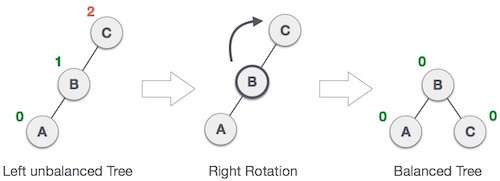
上图是一个右旋转操作
左-左(LL)向右的单旋转,顺时针旋转
这种情况出现于左侧子节点高度大于右侧子节点高度

1
2
3
4
5
6
7
8
9
10
| // 左-左(向右顺时针旋转)
rotationLL(node) {
// 保存节点的left
const tmp = node.left
// 将节点的left修改为tmp的right
node.left = tmp.right;
// 将tmp的右侧设置为node
tmp.right = node
return tmp
}
|
右-右(向左逆时针旋转)
这种情况出现于右左侧子节点高度大于左侧子节点高度
和上面一样,只需要左右换一下即可
1
2
3
4
5
6
7
8
| // 右-右(向左逆时针旋转),和上面一样,只需要左右换一下即可
rotationRR(node) {
const tmp = node.right
node.right = tmp.left;
tmp.left = node
return tmp
}
|
左-右(LR)向右的双旋转
这种情况出现于左侧子节点高度大于右侧子节点高度,并且左侧子节点右侧教重
先向左,在向右
1
2
3
4
5
6
| // 左-右(LR):向右的双旋转
// 先进行一次左旋,在进行一次右旋
rotationLR(node) {
node.left = this.rotationRR(node.left)
return this.rotationLL(node)
}
|
右-左(RL)向左的双旋转
这种情况出现于右侧子节点高度大于左侧子节点高度,并且右侧子节点左侧教重
先向右,在向左
1
2
3
4
5
6
| // 左-右(RL):向左的双旋转
// 先进行一次右旋,在进行一次左旋
rotationRL(node) {
node.right = this.rotationRR(node.right)
return this.rotationLL(node)
}
|
插入节点
1
2
3
4
5
6
7
8
9
10
11
12
13
14
15
16
17
18
19
20
21
22
23
24
25
26
27
28
29
30
31
32
33
34
35
36
37
38
39
40
41
| // AVL树插入节点
insert(key) {
this.root = this.insertNode(this.root,key)
}
// 插入节点就是BST树和上面旋转节点的方法结合起来,每次插入节点都做一个平衡性检查
insertNode(node, key) {
// 节点不存在,直接创建节点
if (node == null) {
return new Node(key)
} else if (this.compareFn(key,node.key) === Compare.LESS_THAN) {
// 小于当前节点插入到左侧
node.left = this.insertNode(node.left,key)
} else if (this.compareFn(key,node.key) === Compare.BIGGER_THAN) {
// 大于节点插入到右侧
node.right = this.insertNode(node.right,key)
} else {
// 重复的key
return node
}
// 平衡性检查
// 计算当前节点是否平衡
const balanceFactor = this.getBalanceFactor(node)
// 左侧节点高度-右侧节点高度 等于2, 左侧倾斜
if (balanceFactor === BalanceFactor.UNBALANCED_LEFT) {
if (this.compareFn(key,node.left.key) === Compare.LESS_THAN) {
node = this.rotationLL(node)
} else {
return this.rotationLR(node)
}
}
//右侧节点高度-左侧节点高度 等于-2,右侧倾斜
if (balanceFactor === BalanceFactor.UNBALANCED_RIGHT) {
if (this.compareFn(key,node.right.key) === Compare.BIGGER_THAN) {
node = this.rotationRR(node)
} else {
return this.rotationRL(node)
}
}
return node
}
|
旋转汇总

红黑树
红黑树和AVL自平衡树相似,不同的是,如果我们需要多次插入和删除的自平衡树,使用红黑树更好。如果插入和删除频率较低,那么AVL树比红黑树更好。红黑树也是二叉搜索树
主要应用为存储有序的数据,时间复杂度为O(lgn)
红黑树遵循的原则
- 每个节点不是黑的就是红的
- 树的根节点是黑的
- 所有叶节点是黑的(用
null表示的节点)
- 如果一个叶节点是红的,那么他的两个子节点是黑的
- 不能有相邻的红节点,一个红节点不能有红的父节点或者子节点
- 给定的节点到后代节点(
null叶节点)所有路径包含相同数量的黑色节点

1
2
3
4
5
6
7
8
9
10
11
12
13
14
15
16
17
18
19
20
21
| // 红黑树节点
class RedBlackNode extends Node {
constructor (key) {
super(key)
// 默认是红色
this.color = Colors.RED
// 对父节点的引用
this.parent = null
}
isRed () {
return this.color === Color.RED
}
}
class RedBlackTree extends BinarySearchTree {
constructor (compareFn = defaultCompare) {
super(compareFn)
this.compareFn = compareFn
this.root = null
}
}
|
插入节点
1
2
3
4
5
6
7
8
9
10
11
12
13
14
15
16
17
18
19
20
21
22
23
24
25
26
27
28
29
30
31
32
33
34
35
36
| insert(key) {
// 如果节点为空,直接插入节点
if (this.root === null) {
// 初始化一个红黑树节点
this.root = new RedBlackNode(key)
// 红黑树添加一个color,因为默认为红色,手动修改根节点为黑色
this.root.color = Colors.BLACK
} else {
// 否则插入节点
const newNode = this.insertNode(this.root, key)
// 验证插入的节点
this.fixTreeProperties(newNode)
}
}
// 向红黑树插入节点
insertNode(node, key) {
// 插入节点,当前传入的key节点比node.key小
if (this.compareFn(key, node.key) === Compare.LESS_THAN) {
// node的左侧节点
if (!node.left) {
node.left = new RedBlackNode(key)
node.left.parent = node
return node.left
} else {
return this.insertNode(node.left,key)
}
} else if (!node.right) {
node.right = new RedBlackNode(key)
node.right.parent = node
return node.right
} else {
// 当前传入的key节点比node.key大,插入到右侧
return this.insertNode(node.right, key)
}
}
|
插入节点之后验证红黑树属性
1
2
3
4
5
6
7
8
9
10
11
12
13
14
15
16
17
18
19
20
21
22
23
24
25
26
27
28
29
30
31
32
33
34
35
36
37
38
39
40
41
42
43
44
45
46
47
48
49
50
51
52
53
54
55
56
57
58
59
60
61
62
63
64
65
66
67
68
69
70
71
72
73
| // 插入节点之后重新验证节点,重新填色和旋转
fixTreeProperties (node) {
// 因为新建的节点默认是红色,连续插入多个节点会违反上面不能有相临近的红色节点,所以我们需要重新填色和旋转
// 这里的node是插入的那一个node节点,从这一个节点开始向上遍历其父节点
// 因为节点不能有两个连续的红色节点,我们找到两个连续的红色节点
while (node && node.parent && node.parent.color.isRed() && node.color !== Color.BLACK) {
// 进入这里证明有两个相邻的红色节点
let parent = node.parent
const grandParent = parent.parent
// 判读当前节点在左侧还是在右侧
// 祖父节点的左侧和父节点相等,就证明是左侧,因为是一个东西
if (grandParent && grandParent.left === parent) {
// 获取到叔节点,即父节点的另外一侧如果也是红色,只需要重新填色
const uncle = grandParent.right
// 叔节点也是红色
if (uncle && uncle.color === Colors.RED) {
// 改变祖父节点颜色
grandParent.color = Colors.RED
// 改变父节点颜色
parent.color = Colors.BLACK
// 改变叔节点颜色
uncle.color = Colors.BLACK
// 重新修改引用继续检查
node = grandParent
} else {
// 右侧叔节点是黑色,2A情况
if(node === parent.right) {
// 在根节点左侧,子节点偏右的情况
// 先左旋
this.rotationRR(parent)
node = parent
parent = node.parent
}
// 在根节点左侧,子节点偏左的情况,3A情况
this.rotationLL(grandParent)
parent.color = Colors.BLACK
grandParent.color = Colors.RED
node = parent
}
} else {
// 在右侧节点,和上面相反的
const uncle = grandParent.left
// 叔节点也是红色
if (uncle && uncle.color === Colors.RED) {
// 改变祖父节点颜色
grandParent.color = Colors.RED
// 改变父节点颜色
parent.color = Colors.BLACK
// 改变叔节点颜色
uncle.color = Colors.BLACK
// 重新修改引用继续检查
node = grandParent
} else {
// 右侧叔节点是黑色,2B情况
if(node === parent.left) {
// 在根节点右侧,子节点偏左的情况
// 先右旋
this.rotationLL(parent)
node = parent
parent = node.parent
}
// 在根节点右侧,子节点偏右的情况,
this.rotationRR(grandParent)
parent.color = Colors.BLACK
grandParent.color = Colors.RED
node = parent
}
}
}
}
|

2A和3A情况

2B和3B
本文标题:数据结构(六)-树,二叉树,二叉搜索树(BST),树的遍历
文章作者:Niuhk
发布时间:2021-12-02
最后更新:2022-01-23
原始链接:https://www.niuhk.cn/2021/12/02/数据结构(六)-树,二叉树,二叉搜索树(BST),树的遍历/
版权声明:转载请注明出处!